


In an era where anyone can build an app without writing code, the people who will succeed are those who understand how systems think — not just how to operate them.
No time to read? Here’s the TL;DR 👇
Working effectively with AI doesn’t require a computer science degree, but it does require understanding the language and structure of the systems we create. Here are three key capabilities worth focusing on:
- Knowing how to clearly explain and define what you want — sharp, precise descriptions dramatically improve the quality of outputs
- Understanding the structure of systems — becoming familiar with concepts like Frontend, Backend, API, databases, and storage, so you can speak the same language as developers
- Adopting a product manager mindset — knowing how to break down a problem, define goals, prioritize stages, and connect the solution to the user experience
And now, for those who are ready to dive in 😉
Why does understanding technology still matter in the No Code era?
Yes, artificial intelligence allows us to build applications without knowing how to code. But does that mean we don’t need any technical understanding at all? Not quite — at least not yet.
It’s true that today you can build applications simply by talking to them (Vibe Coding), and there are many positive aspects to that. Programming languages are no longer a barrier preventing people with great ideas from creating applications — and we have AI to thank for that. You can think of it a bit like Google Translate.
Imagine you’re traveling abroad — say, to China — and you need to tell a taxi driver where you’re going. When I backpacked there after my military service, I had to make sure someone wrote the address in Chinese on a piece of paper so I could show it to the driver. Today, we simply open Google Translate, explain in our own language, and Google Translate tells the driver exactly what we need. AI tools like Lovable do exactly the same thing. These tools “listen” to our requests (features) in plain language and simply translate them into JavaScript (the Chinese of the tech world 😉).
What are the three capabilities worth investing in?
If I had to invest my time today — as I approach 40 — in something meaningful, here are the two things I would focus on:
- Improving my ability to express myself clearly — working with AI tools requires us to explain very precisely and in detail what we’re trying to achieve. The more clearly and accurately we can describe what needs to be built — and just as importantly, what needs to be fixed — the better the results we get. And in a world where AI is playing such a significant role, interpersonal and communication skills like these are incredibly valuable. So it’s a win-win.
- Developing a product manager mindset — in short, just like product managers, you need to define the goal of the application, break the work into milestones with clear outcomes, emphasize user experience, ship what’s ready, learn, and iterate.
- Learning how systems work — I’m going to say a scary word… architecture. To build websites or applications, you need to understand what they’re made of and how they work. I’m not suggesting you become a software engineer — just invest a little time in gaining a basic understanding of how an application is built, what it’s composed of, what drives it, what interfaces it has, and whatever else interests you.
How is a system built?
Full disclosure: I don’t come from a coding background. I didn’t study computer science (something I occasionally regret). My background is in learning and organizational development — essentially HR. But I thought it might be useful to put together a diagram (decidedly non-professional) showing what an application is made of. Here it is 👇
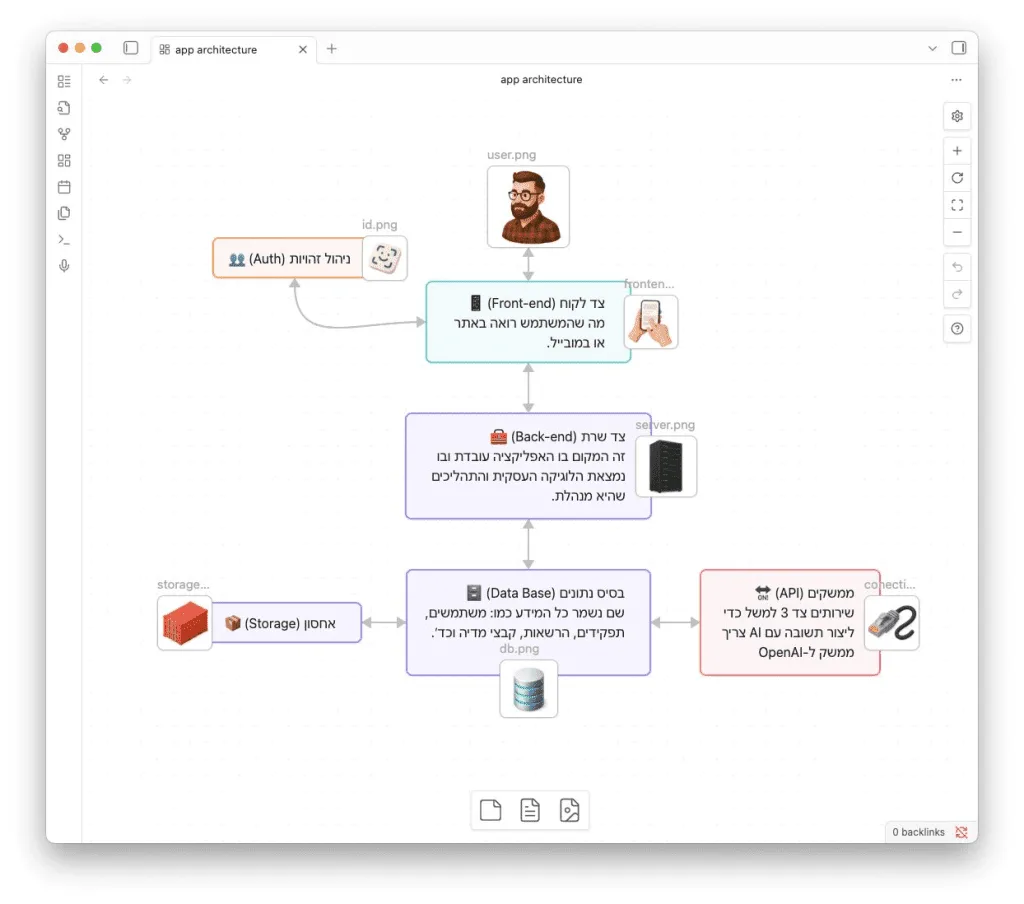
What components are there and what do they do?
-
Client side — this is the part exposed to users in the browser or app, allowing them to interact with the application. It handles user interaction, passes variables to the server for processing, and displays the response back to the user.
💡 Example: Say you built an app that lets users paste a link to an article and receive a summary. On this side, the user sees a screen where they can enter the article’s URL and click Submit. Once clicked, the URL is sent to the server side, the server processes it, and returns the summary to the user on screen. -
Server side — this is where the application’s logic lives: what it needs to do, how it should do it, which external services it’s connected to, what types of users exist, what permissions each user type has, and so on.
💡 Example: After the user submits the article URL, the backend needs to visit the site and “read” the article (this is called scraping — extracting content from the page). Once the content is collected, it’s processed to extract the key points and rephrase them in plain, conversational language, then returned to the user as a summary. -
Database — this is where tables containing data and variables are stored. For example: a users table that stores information about every registered user, and a roles and permissions table that maps user types to their access levels within the system. In order for the user interface to display results, it needs to “fetch” them from the database.
💡 Example: Suppose I built the system and want to see all the users who have signed up. I’d need different screens showing different data (based on permissions) for different user types. That’s exactly why you need separate tables in the DB to manage user types and permission levels. And it doesn’t stop there — our app generates article summaries, which means it also needs a table storing article URLs so it knows which article to summarize for which user. You get the idea. -
Storage — the storage layer is designed to hold large files such as images, audio files, videos, or documents (PDFs). Unlike the database, which stores structured and textual data, the storage layer holds the actual files. This typically involves dedicated cloud services like Amazon, Google Cloud, or Azure, which provide fast access from anywhere, easy sharing, and automatic backups.
💡 Example: Any images or audio files the app displays to users are saved in the storage layer. When a user wants to view or listen to something, the server returns a secure link to the relevant file. -
Interfaces — when building an application, you don’t necessarily build every process from scratch. Often, we choose to connect external services such as email, AI, or payment processing. The better you understand which services can be integrated and which interfaces to use, the more you can expand your application’s capabilities without building everything from the ground up.
💡 Example: Our app summarizes articles. To do that, we need to connect to a large language model (LLM) that can read the article and extract the key points. This connection is called an API, and it allows us to link our application to a service like OpenAI, or to a payment processor.
In short, the AI revolution doesn’t eliminate the need to understand technology — it simply makes that understanding more accessible and empowers us to become entrepreneurs who can create mini-applications and services. But if we want to take them to production-ready status, we need to understand how applications work, ask smarter questions, and collaborate effectively with developers in order to build better products — even if we’re not writing the code ourselves. A basic understanding of technical architecture isn’t a nice-to-have. It’s what transforms you from someone with ideas into someone who leads products.