

What Exactly Is a PRD and What Is It Used For?
Let’s start with the basics. A PRD — Product Requirements Document — is a document that clearly defines 4 things:
- What are we building?
- Why are we building it?
- Who is it for?
- How is it supposed to work (functionally)?
In simple terms, it’s the roadmap of a product or application we’re planning to build. A PRD is a central tool in every technology project. It allows product managers and the project team to clearly define: what problem the product is meant to solve, what its functionality is, who the target audience is, what integrations are required, and how the product is supposed to work.
It looks like this 👇 (by the way, you can download a template I prepared right here)
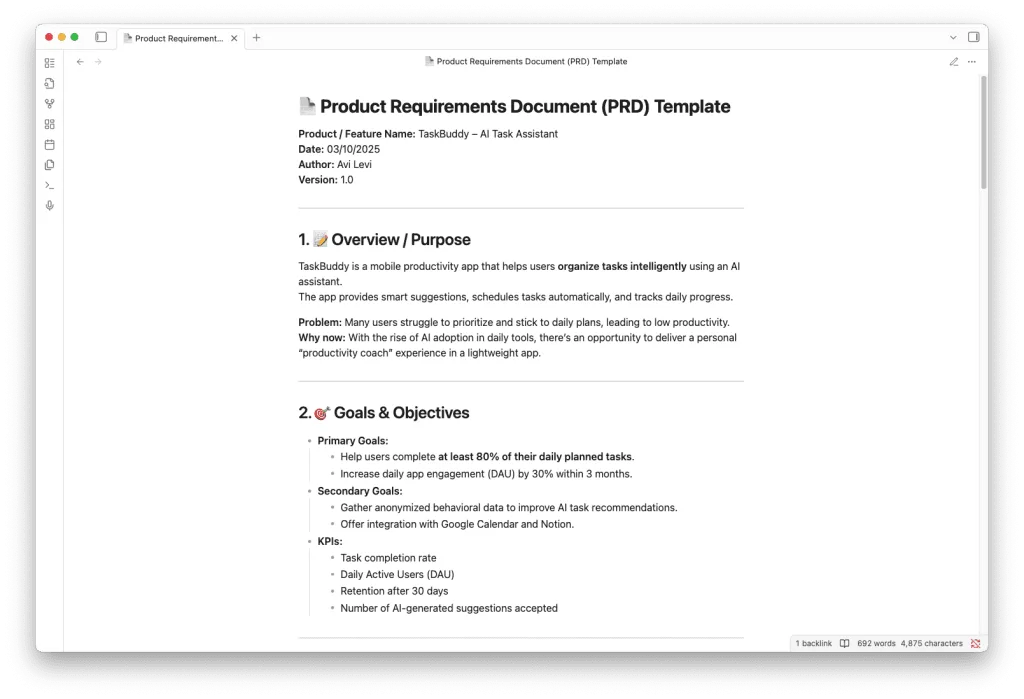
View and download the PRD template
What Should a Requirements Document (PRD) Include?
- Product Overview/Purpose — A summary of the problem, the business opportunity, and the product’s unique advantage.
- Goals, Objectives, and Success Metrics (Goals & Objectives) — Business goals, product goals, and clearly defined, measurable KPIs.
- Target Users and Personas — An analysis of the users, their needs, and their pain points.
- Scope — A clear definition of what is included in the MVP and what is deferred to later stages.
- User Stories/Use Cases — Customer journeys and usage scenarios that demonstrate the product’s functionality.
- Functional Requirements — All mandatory system requirements at the feature level: what each feature is supposed to do and what the desired outcome is. In some cases, architecture is incorporated here as well.
- Non-Functional Requirements — Security, performance, user experience, scalability, accessibility, and similar requirements.
- UI/UX — Defining the user experience, including guiding design principles, wireframes of key screens, and primary interactions.
- Dependencies & Assumptions — External technologies, integrations, and predefined assumptions.
- Timeline/Milestones — A work plan and targets for the initial phases.
- Metrics & Success Criteria — How product success will be measured through defined KPIs.
- Open Questions & Risks — Issues requiring resolution, anticipated problems, and initial mitigation approaches.
- Stakeholders — Who owns and approves the document and the actual development.
- Supporting Materials — Research, diagrams, competitor comparisons, design inspiration, and so on.
Why Does This Matter When Working with AI Agents?
In complex products such as applications with many features, every interaction with a language model involves a large amount of information. Because every model has a context window limit, the longer or more scattered the information becomes, the greater the risk that the model will “lose” parts of the context. Once the context is imprecise, the responses become less focused, and you find yourself going through repeated rounds of re-explanation and corrections. In complex cases, this can turn into an endless loop of reformulations that wastes time, causes frustration, and disrupts the flow of development.
This is where the PRD comes in, playing a central role in context engineering when working with development agents such as Claude Code or Codex. The PRD gives the model an organized, clear picture of the project — its goals, development boundaries, capabilities, and current stage. This allows the model to produce more accurate results, even as conversations grow longer.
What Does “Context Engineering” Consist Of?
Context engineering is made up of several layers that work together to allow the model to deeply understand the project and the situation at every stage:
- Static Context — Includes specification documents and the PRD, architecture, requirements, feature lists, fixed procedures, and working methodologies. This information does not change between conversations and serves as the project’s “long-term memory.”
- Session Context — Information that accumulates during active work, such as recent conversations, decisions made in the current session, and the latest development status. The goal is to maintain logical continuity across multiple interactions rather than “starting from scratch” with every question.
- Operational Instructions — Define for the model “how to think and act,” for example: assigning a role (“act as a development team lead”), working rules and methodology (Agile, TDD, etc.), and preferred code or writing style. These instructions influence the style and process of work, not just the content.
- Dynamic Scoped Context — Helps address the context window limitation. Rather than loading all information in every conversation, only the components relevant to the current stage or task are loaded. For example: when writing a specific feature, only the specification relevant to that feature is loaded.
- Meta Context — A document that functions as a management component, allowing the agent to understand the overall state of the project: which tasks have been completed, which features and components exist, and what still needs to be developed.
The combination of these five components makes it possible to manage a complex development process with a language model without losing focus, while maintaining consistency and dramatically reducing the amount of manual clarification needed along the way.
So if you want to start working with Claude Code in a smart, organized way, try writing a PRD for your next project and incorporating it as part of the agent’s context.