

What Is an API, Exactly?
If you use artificial intelligence, you’ve probably heard the term API — Application Programming Interface. If you want to get the most out of AI tools, it’s worth understanding what an API is in the context of AI and why it matters so much. So let’s start from the beginning, without the jargon — just what you need to know to start connecting different worlds together.

API might sound like a developer term, but in plain language, it’s simply the way software, tools, and services “talk” to each other. Here’s a simple example: say you open the weather app on your smartphone to decide what to wear today. The app doesn’t generate the forecast itself — it just displays it. What actually happens is that the app reaches out to an external service through an API, pulls the relevant data, and presents it within the app. All the communication between the app and the service happens behind the scenes.
How Do APIs and AI Work Together?
Large language models (LLMs) are great at generating text, but they can’t do much beyond producing human-sounding output — and that’s exactly where APIs come in. Say you ask ChatGPT or Claude, “When is my next meeting?” The answer you’ll get is: “I don’t have access to your calendar.”
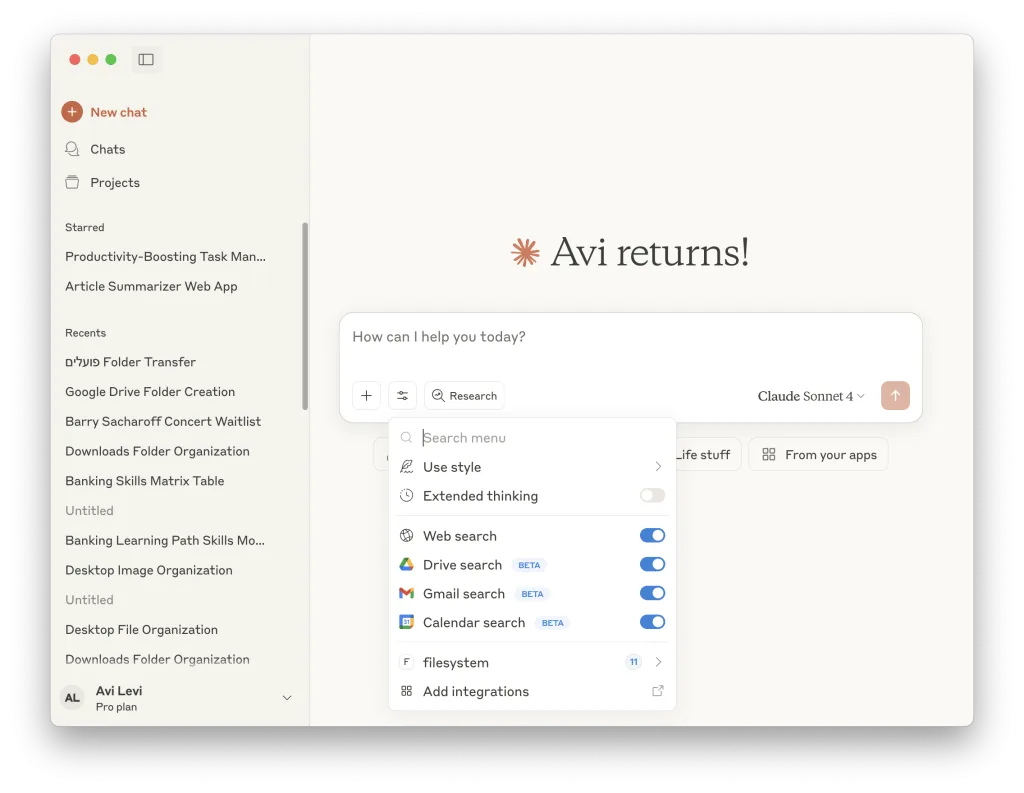
But if you connect the language model to your Google Calendar via an API, the model can retrieve that information and return a real answer. The model itself hasn’t changed — it simply gained access to an external tool.
Today, as of the time this post was written, many of the leading language models already have built-in integrations with tools like Google Drive. These allow you to ask questions about documents you’ve saved, generate summaries and new documents, retrieve information from your calendar — and the list keeps growing. This is essentially the shift from a closed input–output environment to actually using AI capabilities in the real world.
How Does an API Relate to Automation?
Automation is a process in which one or more actions are performed automatically, without manual intervention. Typically, we define the workflow and the actions the automation will carry out. For example, a process where every time I ask about a meeting, an AI checks my calendar and returns an answer. That’s no longer just text — it’s execution. But it follows a fixed script.
Tools like Zapier, Make, or n8n allow anyone — even without a technical background — to build smart workflows based on APIs. So automation is essentially a “conversation” between systems, and the API is the “language” those systems use to talk to each other.
Automation is made up of three components:
- Trigger — What kicks off the process? For example: receiving an email or a form submission on a website.
- Action — What needs to happen? For example: sending an email to the user who submitted the form.
- Integration — What data is being pulled? From which tool? What happens with it, and how is it passed along? This is all done via API.
Here’s an Example of an AI-Powered Automation
A user asks a language model, “When is my meeting with Alon?” ⬅️ GPT checks the calendar, identifies the meeting and its details ⬅️ The model replies, “Wednesday at 4:00 PM at Café Natan.”
Each step in this process uses a different API, and the AI fits in wherever understanding or classification is needed. This is how we create automated, efficient workflows that run in seconds and allow for personalization through the integration of artificial intelligence.
However, if we immediately follow up with “What’s the weather like that day?”, the automation will fail — because it was built to check calendar data, not weather. In other words, automation is a predefined sequence of actions that we decided it would perform. This is still not an agent.
What Are AI Agents, and How Do APIs Fit In?
AI agents are not chatbots that “merely” answer the questions we ask them. Agents receive a goal and “think” about how to achieve it. Unlike automation, an agent “replaces the human as the one who thinks” — it plans what to do, activates different tools to execute, checks whether it has reached the desired outcome, and goes back to correct or improve as needed until the goal is achieved. An agent’s ability to activate tools depends entirely on its ability to communicate with those tools via API. It’s also worth noting that a more advanced communication protocol now exists, called MCP — Model Context Protocol.
An Example: A Meeting Scheduling Agent
Say we want to create an agent that writes a daily LinkedIn post about the latest news in artificial intelligence. This used to take hours — today an agent can handle it on its own. The process would look something like this 👇
- Information gathering: The agent accesses Perplexity to conduct web research, find relevant articles, and summarize them.
- Drafting: The summary is passed to Claude (or GPT), along with a tailored prompt requesting a post written in a professional, clear, and slightly witty tone — one that reflects how we actually write.
- Self-review: The agent runs an additional model that evaluates the text against web writing principles (for example: Is there a call to action? Is the tone on point?). If there are notes, the agent revises and submits an updated version.
- Final output: Only once the post meets all the criteria is it automatically published to LinkedIn.
The key word here is context. An agent — unlike automation — needs to “make decisions” on its own, carry out actions without our involvement, and uses APIs to operate in the real world.
The Differences at a Glance
| Language Model | Automation | AI Agent | |
|---|---|---|---|
| Responds to text | ✅ | ✅ | ✅ |
| Executes actions | ❌ | ✅ (based on a predefined workflow) | ✅ (based on independent planning) |
| Makes autonomous decisions | ❌ | ❌ | ✅ |
| Adapts to the situation | ❌ | ❌ | ✅ |
| Initiates actions | ❌ | ❌ | ✅ |
| Performs automatic improvements | ❌ | ❌ | ✅ |
APIs Enable AI to Take Action on Our Behalf
When we talk about artificial intelligence, we usually think of it as a content creation tool. But APIs allow AI to “step outside the walled garden” and take actions in our place — not just draft an email, but actually send it.
Once we understand what an API is and how it works, we can identify which processes are good candidates for automation: tasks that repeat, involve multiple systems, and always follow the same format. The way to connect all the dots in an automation is through an API. Even if you have no technical background, there are plenty of platforms that make this accessible — like Zapier, Make, or n8n.
Here are a few tools worth knowing 👇
| 🛠️ Tool | Description | Accessibility | Best For |
|---|---|---|---|
| Make.com | A visual platform for building complex API-based automations. Lets you work with thousands of services in a drag-and-drop interface. | High — no coding required | Small businesses, freelancers, marketing managers, product people |
| Zapier | An easy-to-use automation platform with quick connections to popular apps. Supports thousands of integrations. | Very high — the easiest to get started with | Non-technical users, small businesses, marketers |
| n8n | An advanced, open-source automation platform. Offers full control, including the ability to write custom code within workflows. | Moderate — requires some technical orientation | Developers, DevOps professionals, users who want flexibility and self-hosting |
Thanks to APIs, artificial intelligence evolves from a tool that writes text into a partner that genuinely acts on our behalf. Once you understand this connection and know how to work with it, you’ll shift from being someone who uses technology to someone who manages it.