

At its core, MCP (Model Context Protocol) is a way of enabling AI agents to interact with other tools (on your computer or third-party services) in order to perform tasks on our behalf. To understand what MCP is, we first need to understand how systems were connected before it existed. In a previous video, we explained what an API (Application Programming Interface) is and how it allows software to “talk” to one another through a communication protocol that “translates” information from one system to another. This is how you can connect a language model like GPT or Claude to tools like Gmail, request information such as the contents of your emails, and get back a summary (by the way, if you haven’t watched it yet, now’s the time! ⏰). The key thing to remember is that this API was built specifically to perform that one particular task.
🧩 What Is MCP?
MCP (Model Context Protocol) is a new, open-source communication protocol invented by Anthropic (the company behind Claude). It was designed specifically to connect large language models (LLMs) and AI agents to data sources, services, and external tools such as systems and development environments.
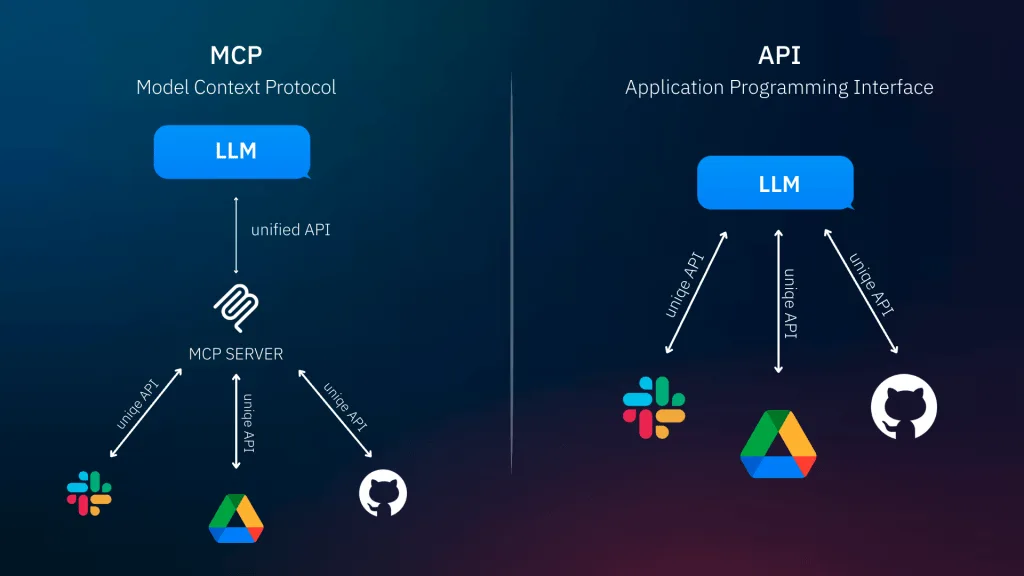
Instead of requiring a custom connection every time a language model needs to interface with an external system (as is the case with APIs), MCP offers a unified standard that simplifies the process. It enables models to understand context, retrieve relevant information, and respond accurately and in a data-driven way – and crucially, it eliminates the need for developers to build a unique interface for every tool.
Unlike an API, which requires a unique and separate connection for each data source, MCP acts as a “smart mediation layer” that allows a language model to independently determine which data is relevant, access it in the right context, and integrate it into the workflow. This removes the need for custom integrations with every system, and allows models to operate on up-to-date information in a consistent, secure, and context-aware manner.
ℹ️ Interestingly, this is similar to another protocol we all know: HTTP (HyperText Transfer Protocol), which allows our browser to communicate with websites. When we type a web address into the address bar, the browser sends a request for the site’s content (text, images, and files) to a remote server, receives the data, and displays it in the browser.
What Can You Do with MCP?
Let’s say, just as an example 😉, that my Downloads folder is a complete mess. We all dump everything in there and rarely go back to tidy it up – it’s a tedious task that nobody wants to deal with. So why not use MCP to sort and organize it for us?
In the first step, we need to make sure we have the Claude desktop app installed and grant it access to folders on our computer. You can see exactly 👈 how to do that here – it requires only basic technical know-how. Once you’ve configured it, make sure to restart the app.
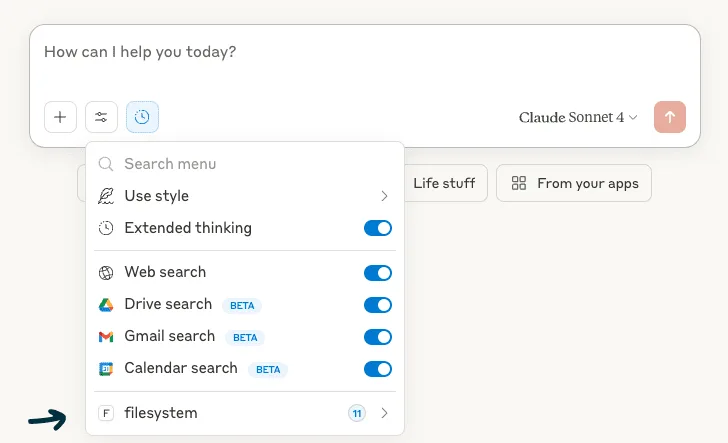
If you’ve done it correctly, when you open Claude and start a new conversation, you’ll see a new option called “Filesystem” added to the menu under the Tool icon, as shown in the screenshot below 👇. Clicking on it lets you view and configure which operations are permitted in your folders – for example: reading a file, writing, creating folders, moving files between folders, and… you get the idea.
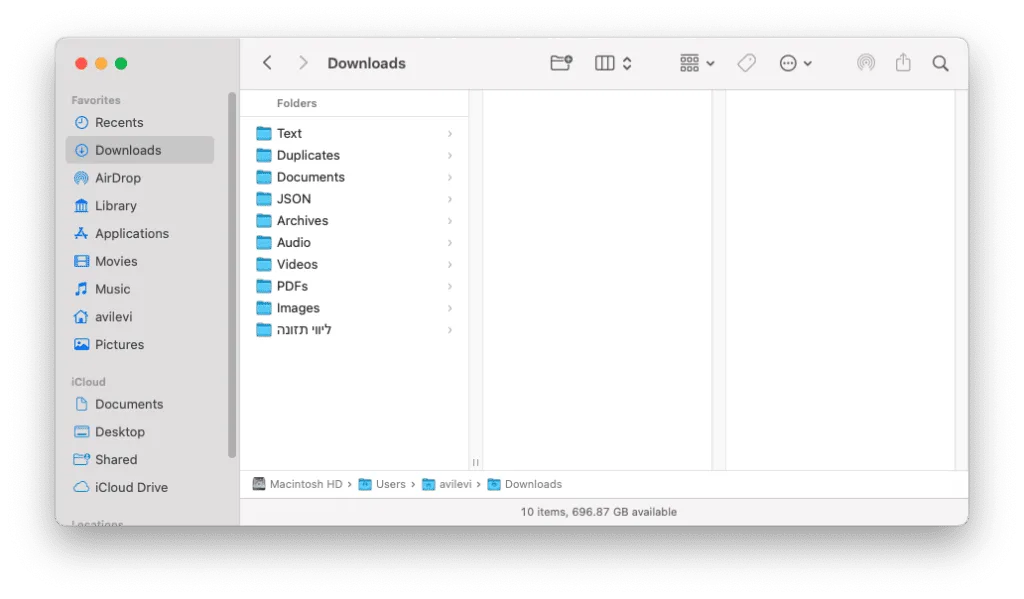
In the second step, all you need to do is write a prompt explaining to Claude what you want it to do. I asked it to go through all the files in my Downloads folder, categorize them by type, create a folder for each category, move the relevant files into each one, and delete any duplicates it finds. After Claude worked its magic, here’s what it looked like 👇
What Business Applications Use MCP?
Imagine a small startup receiving dozens of resumes every week. The hiring manager can’t keep up. Screening, summarizing, and sending emails becomes a daily burden. So the recruiter builds an assistant with MCP. The assistant accesses a file in Drive, summarizes the key information from each resume, enters the data into the CRM, and sends a personalized email to each candidate – all without a single line of code or any manual integrations. You simply describe what needs to happen, and the AI assistant takes care of it.
What’s the Difference? API vs. MCP
| Topic | API | MCP |
|---|---|---|
| What is it? | An interface that allows one system to call the functions of another | An open, standardized protocol that enables AI models to understand and access context from multiple systems |
| What is the goal? | To perform actions, retrieve or update data based on specific requests | To enable models to understand broad context from multiple data sources and act intelligently based on that context |
| How does it work? | Calling functions (GET, POST, PUT, etc.) according to API definitions | Bidirectional connection between models and servers via a fixed protocol (MCP server + client) |
| Does it require customization per system? | Yes – every API is unique and requires a custom integration | No – MCP aims to create a unified standard that replaces custom integrations for each source |
| What is the emphasis? | A specific action based on a developer's request | Rich context, intelligent data retrieval, and transparent integration of models into existing tools |
| Who uses it? | Any developer who wants to connect systems together | Developers of AI applications, companies connecting models to internal knowledge sources |
Why Is MCP an Upgrade?
Because it doesn’t replace the API – it wraps it in a smart context layer. Instead of building custom connections to every data source, MCP lets you use a single protocol that understands how to access tools, interpret information, and integrate it seamlessly – essentially creating a smart system of specialized micro-experts.
Which brings us to a question worth asking: what tools would you connect to your language model so it could handle tasks for you and make your life easier?