

If you’ve started integrating AI tools into your daily workflow, you already know that everything begins and ends with good prompts (and if you’re not sure how to write a great prompt, check out the post I wrote on the topic). Nail the prompt and you get a great result; miss the mark and you’re off on an endless journey of rewrites. So if you want to work smarter with AI, prompt manager tools will help you bring some order to the chaos.
The deeper we go with AI, the more prompts we accumulate — and with them, the mess grows. Let’s be honest: we’ve all been there — you craft or stumble upon a fantastic prompt for analyzing data in an Excel spreadsheet, and then a month later you find yourself hunting for it through an endless scroll of chat history.
Today I want to recommend a tool that will bring a little order to that chaos: Prompt Manager Tools 👇✨.
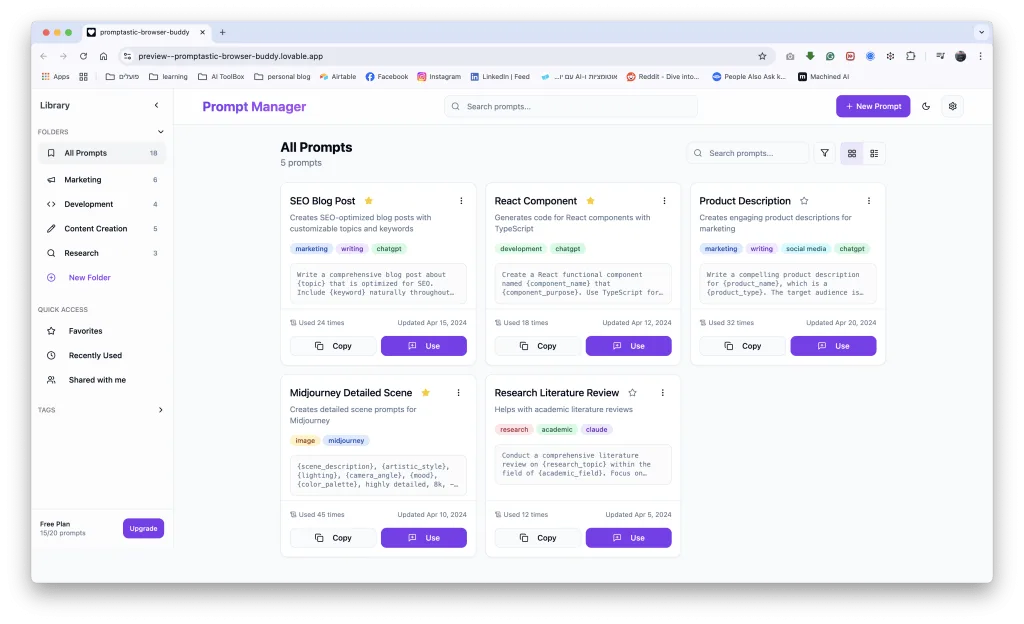
So What Exactly Are Prompt Manager Tools?
In simple terms, these are tools — websites or browser extensions — that help you organize your prompt library in one place, in a smart, convenient, and effective way. They let you save prompts, arrange them in folders, categorize them by topic, share them with others, refine versions — and above all, stop reinventing the wheel every single time.
The ability to produce great results with AI doesn’t depend solely on skill or creativity — it also depends on smart knowledge management. Proper prompt management enables faster, more efficient work by reusing and refining prompts that have worked before, and by improving workflows over time. Without it? You’ll find yourself rewriting from scratch, getting confused between versions, or losing valuable knowledge.
Core Capabilities
- Saving prompts in an organized way — like a smart library 🗄️
- Fast search and easy navigation 🔍
- Effortless sharing with team members or the community 🗣️
- Version management for the same prompt 🗂️
- Performance tracking — identifying which prompts delivered better results 📉
- Personalization: for example, creating templates for recurring prompts 🔁
Three Tools Worth Knowing
| Features | Prompt Library Manager | AI Prompt Genius | RCP (Right-Click Prompt) |
|---|---|---|---|
| General Description | A simple, user-friendly extension for personal prompt management. Allows storing, organizing, and easily accessing your favorite prompts. | An open-source extension for managing a personalized prompt library, including multi-language support and Google Sheets sync. | An extension that provides quick access to prompts via the right-click context menu, including saving, organizing, and auto-inserting prompts. |
| User Interface | Minimalist and straightforward interface | Advanced interface with shortcuts, folders, tags, and multi-language support | Intuitive interface combining a right-click context menu for quick prompt access |
| Search Capability | Search by categories | Advanced search with tags, shortcuts, and Google Sheets sync | Quick search via the right-click context menu |
| Language Support | English only | Supports 12 different languages | Primarily English, with Hebrew support as well |
| Sharing with Others | No | Partial (export for sharing) | No |
| Forms & Custom Templates Support | Yes | Yes | Yes |
| Integration with Other Systems | Google Docs, Gmail | Google Sheets, device sync | Integration with AI platforms such as ChatGPT, Claude, and Gemini |
| Recommended For | Writers, content creators | Researchers, developers, power users | Users who want quick prompt access via the right-click context menu |
| User Rating | ⭐ 5.0 (3 reviews) | ⭐ 3.4 (151 reviews) | ⭐ 5.0 (9 reviews) |
| Price | Free | Free | Free |
| Installation Link | Install | Install | Install |
Not a Fan of Chrome Extensions?
Beyond extensions, you can also manage a smart prompt library in a collaborative spreadsheet — in Google Sheets or Airtable. I’ve put together a Google Sheets template so you can save it and get started right away. This is an excellent solution for anyone working in a team, wanting structure, or looking for an easy way to access prompts from anywhere. You can add tags, document which tool each prompt is suited for, share with colleagues, and build different views — from simple tables to visual boards that feel like a product in their own right.
A Final Word on Prompt Management
Prompt management isn’t just a technical solution — it’s a mindset shift. Instead of treating prompts as one-off throwaway text, we start treating them as digital assets. Just as developers manage code libraries, marketers manage campaigns, and designers manage portfolios — we too need to manage our AI work and turn it into a genuine competitive advantage.
In a world where everyone has access to artificial intelligence, the real edge belongs to those who know how to work smarter with AI — managing their prompts more effectively, asking better and sharper questions, and executing faster.