
In short
Every app is the same few parts, and each part has one job. People building with AI do not need to write them, but they do need to know how to ask about them.
- Front-end – what you see on screen, running on the user’s device
- Back-end – the rules, on a computer you control
- Database and storage – what stays saved after the app is closed
- Outside services and keys – what you rent from other companies
The result: you know where each thing runs and what to ask your AI so the app is also safe.
An app looks like one thing. Behind the screen it is a handful of separate parts, each with one job, passing messages to each other.
Software architecture is simply the plan of which parts exist and which part is allowed to talk to which. It sounds like a programmers’ topic, but today AI tools build these parts for us, and anyone who does not know them cannot tell what is missing.
The CI/CD article followed a made-up invoicing product. This one uses something everybody knows: a food-ordering app. It is made up too, and it is called Tabun.
The simulation: one app from the inside
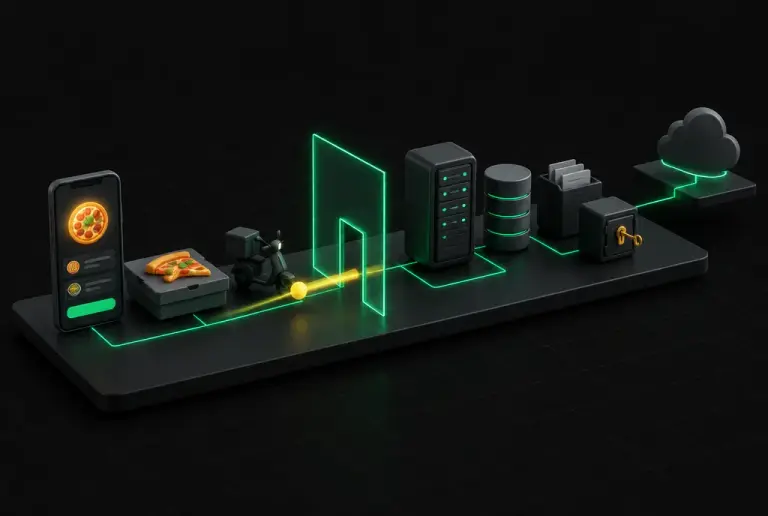
Think of the last time you ordered a pizza on your phone. You tapped a button, and a second later the screen said the order was in. The simulation shows what happened in that second. The board is Tabun, each object on it is one part, and the yellow ball is the request leaving the phone.
Press Start the tour to meet the parts. Then switch to Follow a request and move step by step through five examples. The panel beside the model shows what each part looks like at that moment.
The eight parts
These are the eight parts, in the order a request visits them. In green, what each one looks like in Tabun.
- The userThe person using the app, and the phone or laptop in their hand. Every request starts with them.Dana opens Tabun on her phone to order dinner.
- Front-endThe screens, buttons and forms. It runs on the user’s own device, in their browser or as an app on their phone. It shows information and collects taps and typing. It should not decide anything important.The restaurant list, the menu, the basket and the Order button.
- Identity (Auth)Sign-up, sign-in and "forgot password". Once it knows who you are, it gives the app a pass that travels with every request. It answers two separate questions: who is this, and what are they allowed to do.Dana signs in with her email. From then on every request carries her pass, so the server knows which orders are hers.
- Back-endCode that runs on a computer you control, never on the user’s device. It receives each request, checks the pass, applies your business rules, talks to the database and to outside services, and sends back an answer.When Dana taps Order, the server checks the restaurant is open, works out the price with the delivery fee, saves the order and sends it to the restaurant.
- DatabaseOrganised tables, like spreadsheets, that remember everything after the app is closed. One table for each kind of thing, one row for each item.A Users table, an Orders table, a Payments table. Order 1042 is one row: who ordered (Dana), from which restaurant, the amount and the status.
- File storageA separate place for big files that do not fit in a table. The database only keeps a note of where each file is.Dana’s profile photo, and the receipt for every order.
- Secret keysLong passwords that prove to an outside service that a request comes from your app, and tell it whose account to bill. They are kept in a private settings page on the server, never inside the code.Tabun’s key for the payment service, and its key for the AI service.
- Outside services (API)Things you do not build yourself. Your server sends a request to another company’s service and gets an answer back. An API is the agreed menu of what you can ask for.Stripe takes the card payment, a messaging service says the order is on its way, and an AI model drafts a message to the restaurant.
One rule that explains most of it
If you take one thing from this article, make it the difference between the two sides. The client side is everything that runs on the user’s phone or browser: the screens, buttons and forms. The server side is everything that runs on computers you rent. That is where the rules, the database, the files and the keys live.
Think of it as a restaurant. The client side is the dining room, and everyone can see what happens there. The server side is the kitchen, and customers do not walk in. The glass wall in the simulation is the kitchen door. So the rule is this: whatever matters to you, such as prices and who may see what, is checked in the kitchen, not in the dining room.
The front-end is delivered to the user’s device. With two clicks anyone can open the browser’s tools and read all of it, including anything the AI left there. Treat it like a shop window.
The back-end, the database, the files and the keys run on computers the user cannot reach. Every rule that matters, such as who may see what, what things cost and how many times, has to be checked here.
Where is each part, really?
The parts do not sit in one place. They run on different computers that belong to different companies, and they talk over the internet.
- The user’s deviceThe screens are downloaded to the phone or browser and run there.Front-end runs here
- A host, such as VercelA rented computer that is always on. Your rules and your keys live here.Back-end runs here
- A data service, such as SupabaseOften gives you the database, file storage and sign-in together.Data lives here
- Other companiesAI, payments, email. You pay for each use.Rented abilities
That is why “it works on my computer” means little. The real app is spread over at least three computers.
Why does this matter more when AI builds the product?
AI tools build fast, and what you see on screen looks finished. That is exactly why it helps to know what happens behind it.
- 1A working demo is not proofOne scan, reported by OX Security, of about 5,600 apps built with AI tools found more than 2,000 security holes, over 400 exposed keys and passwords, and 175 cases of exposed personal data. All of them ran fine on screen.
- 2The AI builds the visible part firstScreens look finished within minutes. The parts behind the wall are invisible, so nobody notices when they are missing.
- 3It builds what you mentionIf you never say who may see what, that rule may never be built. The parts above are your checklist of things to mention.
- 4Shortcuts look identical on screenA screen wired straight to the database behaves the same in a demo as one that goes through the server. Examples 4 and 5 above show the difference.
- 5You can report a bug by its address"The screen is right but the saved amount is wrong" sends the AI to the back-end. "It does not work" sends it everywhere.
- 6You get a say in the toolsAsk which tool was picked for each part and why. Fewer services is easier to run. One service that gives database, files and sign-in together is a fine start.
How do you use this with your AI tool?
You do not need to build any part yourself. You need to ask about each one. Every step has a sentence you can give your AI tool.
The first two steps alone give you a clear picture of what was built. The rest close the common holes.
Ask for the map
Start hereDo this on any project, new or old. The answer should match the model above.
Explain this project’s architecture in plain language. For each part (front-end, back-end, database, file storage, sign-in, outside services) tell me which tool is used, where it runs and what it costs.
Describe features part by part
Start hereInstead of "add orders", say what the screen shows, what is saved, and who may see it.
Before you build this feature, tell me what changes in the front-end, the back-end and the database, and who is allowed to see the new data.
Ask where the secrets are
Keys belong in the host’s private settings.
List every secret key this project uses and where each one is stored. Confirm that none of them is in the code or sent to the browser.
Ask who can see what
This is the question AI skips most often.
For every table in the database, show me the rule that decides who can read and change each row. If a table has no rule, add one so users reach only their own data.
Test like a stranger
Open the app in a private window, create a second account, and paste a link that belongs to the first account. If it opens, send this.
A second user was able to open the first user’s page by using its link. Find where the ownership check is missing and add it on the server.
Report bugs by location
Say which part looks right and which looks wrong.
The screen is correct but the saved amount is wrong. Check the back-end code that calculates it, not the front-end.
Short glossary
| Term | What it means |
|---|---|
| Client | The user’s device and the app running on it |
| Server | A computer somewhere else that is always on and answers requests |
| Request / response | One question from the screen, and the answer that comes back |
| API | The list of things one program lets another program ask for |
| Endpoint | One item on that list, with its own address |
| API key | A password that identifies your app to an outside service |
| Environment variable | A private setting kept on the server, outside the code. Keys go here |
| Authentication | Proving who you are |
| Authorization | Deciding what you may see and do |
| Table / row | A sheet in the database / one item in that sheet |
| Hosting / deploy | Renting the computer your app runs on / putting a new version there |
| Stack | The specific tools chosen for each part |
| Pass | The proof of sign-in that travels with every request. Developers call it a session or a token |
| Host | The company that rents you the always-on computer your back-end runs on |
| Glass wall | This page’s picture of the border between the user’s device and your server |
The bottom line
An app built with AI can run fine on screen and still be open at the back. The difference does not show in a demo. It lives in the parts you cannot see.
Start with steps 1 and 4. Ask for the map of your project, then ask who can see what. Those two questions close most of the holes.
Sources: Ravi Mehta, OX Security, Portainer.