
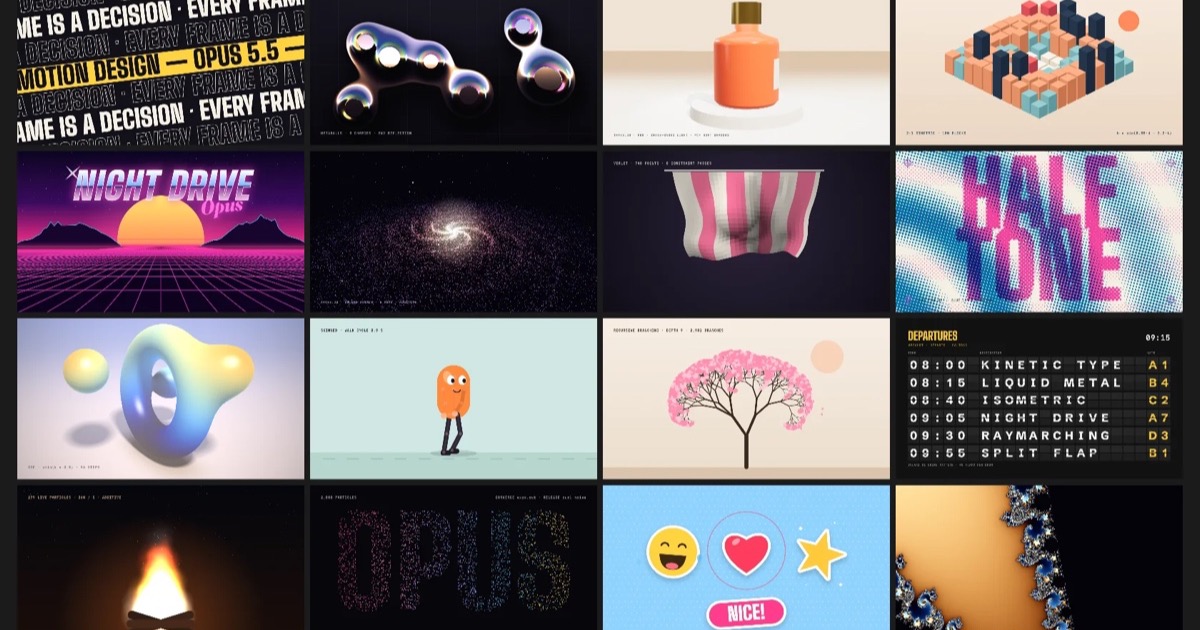
In the last post I asked Opus 5.5 to build a showreel like a motion designer’s, and it made 55 styles, all written in code. After it went up I was left with one question. Nice, but what do you do with it at work?
In the showreel, the motion is the show. In an interface it has to work for whoever is using it. It tells them their tap landed, shows them where something came from, and keeps them from getting lost when something changes.
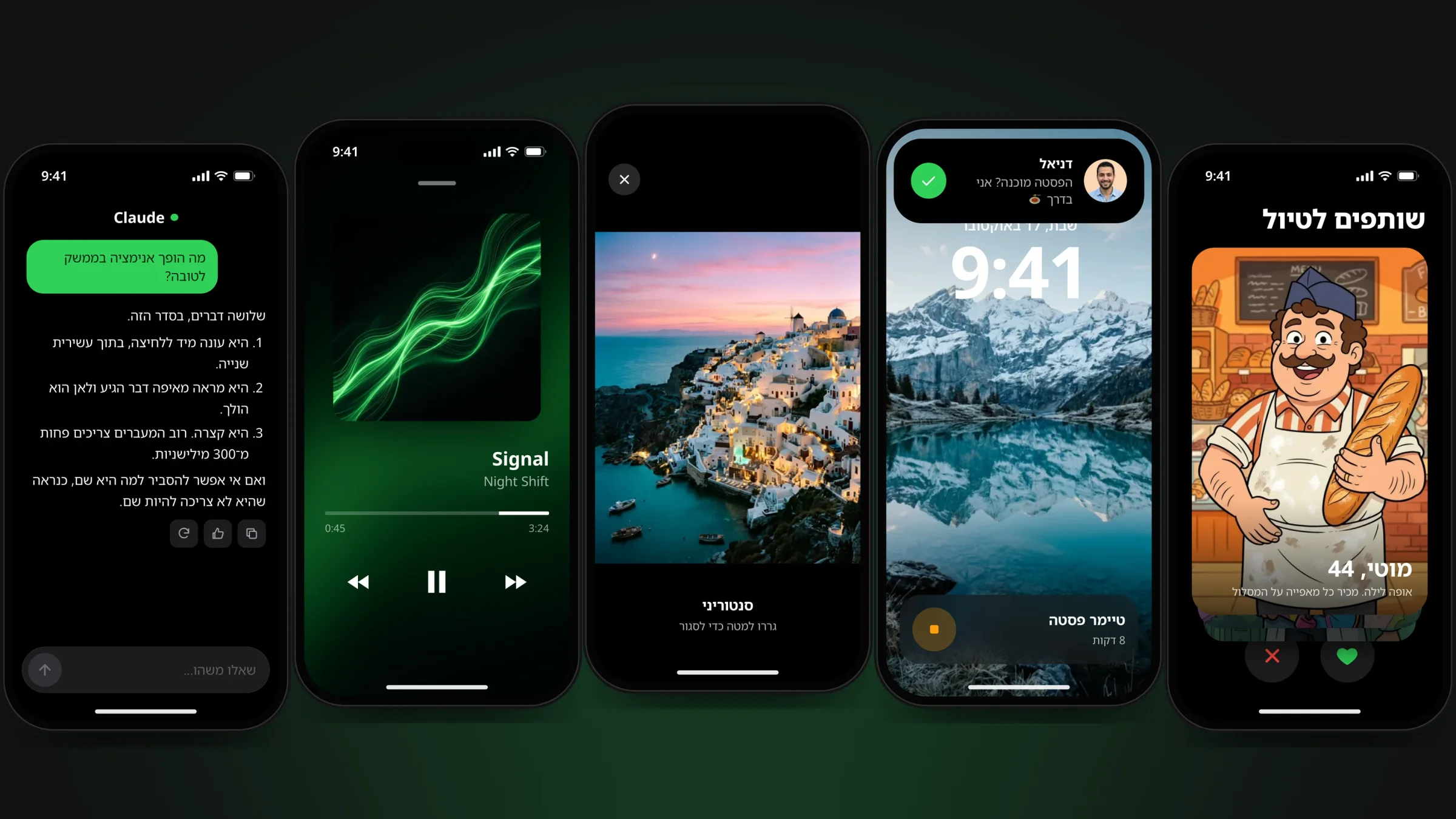
So I asked Opus 5.5 to take the same abilities and build an interface with them. It made 27 examples. 20 components inside a phone, 6 website components and a whole landing page. They are all live, you can tap, drag and throw them, and each one demonstrates itself when it reaches the screen. For each one I added the exact timing and the prompt that made it.
What makes interface motion different from motion graphics
In a video, a good animation is one you want to watch. In an interface, a good animation is one you barely notice. You see it dozens of times a day, and if it is slow or showy it gets in the way by the third time.
So before every motion in these examples I asked three questions, always in the same order.
- How often will people see it?Something people do a hundred times a day, like a keyboard shortcut, needs no animation at all. A rare moment, like a like or a sign-up, can get a little celebration.
- What is it there for?To confirm a tap landed, to show where something came from, or to explain what changed. If you cannot answer, it should not be there.
- How does it end?Motion you can stop halfway, like a drag, has to remember the speed of the finger. And what comes in from below leaves back down.
Four rules behind all 27 examples
The 27 examples
How to use the prompts
- Copy the base promptIt sits at the top of the examples and sets the rules above, so Claude does not reinvent them every time.
- Add the example's promptPaste both together into a conversation with Opus 5.5 or into Claude Code, and you get one HTML file that works in a browser.
- Ask for one change at a timeFor example "slow the spring down" or "use my site's colours". That way it is easy to see what each change does.
- Bring it into the real projectWhen it feels right, ask Claude Code to move it into your project, with the components and colours you already have.
How it was built
Opus 5.5 wrote all 27 examples in plain HTML, CSS and JavaScript, with no animation libraries. Even the springs are computed in code, using the same duration and bounce model Apple uses in its interfaces. I made the photos and the illustrated characters on the cards with Higgsfield.
Each example demonstrates itself with a virtual finger or mouse when it enters the screen. The moment you touch it yourself, the demo stops and it is yours.
All 27 prompts as plain text
Base prompt
Build this as one self-contained HTML file with vanilla JavaScript and no libraries, inside a 300 × 620 phone frame (or a browser window for website components). Animate only transform, opacity and clip-path. Use cubic-bezier(0.23, 1, 0.32, 1) for things that enter or leave, cubic-bezier(0.77, 0, 0.175, 1) for things that move on screen, and keep UI animations under 300 ms unless I say otherwise. Anything a finger can drag or throw follows the finger 1:1 and then settles on a real spring that keeps the release velocity. Use CSS transitions, not keyframes, for anything a user can trigger twice in a second. Never start from scale(0). Gate hover effects behind (hover: hover) and (pointer: fine), and give every animation a prefers-reduced-motion version that keeps the fade and drops the movement.
01 · A save button that talks back
Build a full-width Save button that keeps the same size through three states. Pressing scales it to 0.97 over 160 ms. On click, the label slides up and blurs out while a spinner slides in from below (220 ms, ease-out); when the save resolves, the spinner leaves the same way and a check mark draws itself with stroke-dashoffset (320 ms) next to the word "Saved". Return to idle after 1.7 seconds, ignore clicks while busy, and announce each state with aria-live.
02 · Hold to delete
Build a destructive "Hold to delete" button. While the pointer (or Space/Enter) is held, a red copy of the button is revealed from the start edge with clip-path over 1.4 s linear, since it is a progress indicator; releasing early snaps it back over 220 ms ease-out. When it completes, the file card above fades and scales to 0.94, a "File deleted" message with an Undo link fades in, and a short vibration fires where supported. Undo restores everything.
03 · Add to cart that flies to the cart
Build a product page for headphones. Three colour swatches share one selection ring that glides to the chosen swatch on a spring, while the product photo changes tint with a 350 ms filter transition. "Add to cart" clones the product photo and flies it into the cart icon on a parabolic arc: animate x on an outer wrapper with ease-in-out and y on an inner wrapper with keyframes (up 70 px, then down) over 700 ms, shrinking to 0.08. On landing, the cart icon bumps to 1.3 and back, a badge springs in and its number rolls up. The button label swaps to "Added" with a check for 1.6 s.
04 · A like that smiles back
Build a social post card with a photo and a like button. Liking pops the heart from scale 0.55 on a bouncy spring (bounce 0.45), fills it pink, sends a ring and ten coloured dots outward over 560 ms ease-out, and rolls the like count up by one. Unliking is quiet: a 160 ms press and the count rolls down, no burst. Double-tapping the photo also likes it and pops a big white heart that overshoots, tilts, settles and floats away after about a second. Use aria-pressed.
05 · Switches and a circular theme change
Build an iOS-style settings screen with four switches. Each thumb slides on a spring (bounce 0.18, about 420 ms, as a CSS linear() easing computed from a real spring) and stretches to scaleX(1.22) while pressed; the track colour fades over 250 ms. The Dark mode switch changes the whole screen theme with a circular reveal: clone the screen with the new theme on top and animate its clip-path from circle(0 at the switch centre) to a circle that covers the screen, 680 ms ease-in-out, then swap the real theme with transitions disabled and remove the clone. Use role="switch" and aria-checked.
06 · A shape-shifting Dynamic Island
Build an iPhone lock screen with a Dynamic Island that morphs between three states: idle pill (90 × 27), compact timer (210 × 29, a timer icon on one side and an orange countdown on the other), and an expanded message (266 × 90 with an avatar, a name, a line of text and a green button). Keep one black element of fixed size and animate only its clip-path inset() between the shapes on a spring with a little bounce (0.26, 500 ms). Content for each state fades in from blur(6px) and scale(0.9) after a 90 ms delay. Starting the timer opens the compact state, a message expands it after 1.7 s and it returns to compact after 2.6 s; tapping toggles compact and expanded.
07 · Toasts that stack
Build a toast stack like Sonner at the bottom of a phone screen. New toasts enter from below (opacity and translateY, 420 ms ease). Older ones sit behind the newest, each 12 px higher and 5.5% smaller, and only three show. Hovering the stack spreads them into a list with 8 px gaps. Each toast has a title, a subtitle and an Undo button, leaves after 4.2 s (paused while spread), and can be dragged sideways and thrown away in that direction. Use CSS transitions, not keyframes, so adding toasts quickly retargets smoothly.
08 · A skeleton that becomes real photos
Build a feed of two post cards with avatars, photos and text. While loading, show skeleton blocks with exactly the geometry of the final content and a soft highlight sweeping across them (a transform-only pseudo-element, 1.3 s linear, infinite). When the data arrives, crossfade to the real content over 300 ms, 70 ms apart per card; each photo first appears at blur(14px) and scale(1.08), then sharpens to blur(0) and scale(1) over 500 ms ease-out. Nothing may shift position. A refresh button spins once and replays the load.
09 · A glass tab bar with a sliding pill
Build a floating glass tab bar (backdrop-filter blur and saturate) with four tabs and icons. One pill sits behind the active tab and slides to the new tab on a spring (bounce 0.18). The tapped icon pops from scale 0.7 on a bouncy spring. The page above crossfades and slides 16 px in the direction of travel (300 ms ease-out), so moving right brings content in from the right. Respect right-to-left layouts by flipping the direction.
10 · A gallery you open and drag closed
Build a 3 × 2 photo grid that opens into a full-screen viewer. Use FLIP: place the viewer image at its final 282 × 352 rectangle, then animate its transform from the tapped thumbnail (uniform scale and translate) and its clip-path from an inset that crops it to the thumbnail's square, both on a spring with no bounce (about 440 ms); fade a black backdrop in. Dragging the open photo follows the finger, scales it down with distance and fades the backdrop; past 90 px or on a fast flick it flies back into its exact thumbnail, otherwise it springs back with the release velocity. Hide the original thumbnail while it is open.
11 · A mini player that opens into a full player
Build a music library with a mini player docked at the bottom (cover, title, artist, play/pause, a progress hairline). Tapping the bar opens a full player: animate the full player's clip-path from the mini bar's rectangle to the whole screen, and FLIP the 44 px cover into the 220 px cover, on one spring with no bounce. The title, progress bar, times and controls fade up 12 px with a 40 ms stagger. Play and pause cross-rotate. While paused, the big cover eases to scale 0.86. Next slides the cover out and the new one in on a spring. Close by tapping the grabber or dragging down.
12 · Onboarding with depth
Build a three-page onboarding carousel with a full-bleed photo on top of each page and a title and line of text below. Dragging moves the pages 1:1 with rubber-banding past the first and last page; on release, project the position with the velocity and settle on the nearest page with a physics spring. Parallax: each photo moves at half the page speed and the text slightly faster and fades with distance. The active dot travels continuously with the drag and stretches (scaleX up to 1.55) between pages. The Next button swaps its label to "Get started" on the last page.
13 · A bottom sheet with detents
Build a share sheet with three detents (closed, half, full) over a place page. The sheet follows the finger 1:1 with rubber-banding above the top detent (0.28 resistance). On release, project the position 200 ms ahead with the release velocity, pick the nearest detent and settle there with a physics spring (stiffness 420, damping 40) that starts at the release velocity. As the sheet rises above half height, the page behind scales to 0.925 and moves down 12 px, and a dim layer fades in; tapping the dim closes the sheet.
14 · Cards you throw left and right
Build a swipeable deck of four illustrated profile cards (name, age, one line about them). Dragging the top card moves it with the finger and rotates it by x × 0.065 degrees around a point near its bottom; "YES" and "NOPE" stamps fade in with distance. The next card scales from 0.95 to 1 and rises as the top card moves away. Release past 105 px or faster than 650 px/s throws the card off-screen along its velocity; otherwise it springs back with a little bounce and the release velocity. ✕ and ♥ buttons throw it programmatically. Show an empty state with a restart button at the end.
15 · Swipe to archive
Build a mail inbox whose rows stagger in (opacity and 10 px translateY, 360 ms ease-out, 55 ms apart). Each row can be dragged sideways 1:1; an Archive action is revealed behind it. Past 35% of the width the action turns green and its icon pops to 1.18 on a spring (and a light vibration fires), so the user knows releasing will commit. On release past that point or on a fast flick, the row slides out in 200 ms and the gap collapses in 220 ms; otherwise it springs back with the release velocity. Keep touch-action: pan-y.
16 · A 3D payment card
Build a wallet screen with a payment card that tilts in 3D toward the pointer: map the pointer position to rotateY (±13°) and rotateX (±10°) inside a 700 px perspective, and move a radial glare and a diagonal sheen with it. Do not set the rotation directly; drive it through a per-axis spring (stiffness 200, damping 22) in a requestAnimationFrame loop, so it stays smooth and settles back when the pointer leaves. A Pay button lifts the card to scale 1.06, pulses three NFC rings and then shows a green check with "Paid".
17 · An email field that explains the mistake
Build an email sign-up field with a floating label that moves up and shrinks to 0.76 on focus or when filled (200 ms ease-out, transform-origin on the label's start side). On an invalid submit, shake the field with the Web Animations API (7 px, 340 ms), turn the border red and reveal an error message by transitioning grid-template-rows from 0fr to 1fr. The message names the actual mistake: no @ at all, or nothing after it. Re-validate on input; when valid, collapse the error and draw a check inside the field. A valid submit shows a success screen whose check pops in on a spring.
18 · A verification code that feels alive
Build a six-digit verification code screen with an on-screen keypad and a hidden one-time-code input for real keyboards. A single focus frame glides to the next empty box on a spring, with a blinking caret inside. Each digit pops in from scale 0.4 on a bouncy spring. When six digits are in: a wrong code shakes the row (9 px, 380 ms), tints the boxes red, shows a message, then deletes the digits one by one 45 ms apart; the right code turns the boxes green in a wave 55 ms apart, each hopping 6 px, then shows "Verified" and slides the keypad away.
19 · A dashboard that shows what changed
Build a phone analytics screen with four KPI tiles, a smooth line chart (Catmull-Rom curve, gradient area) and a seven-bar chart. On first view the numbers count up over 900 ms ease-out with tabular figures, the line draws itself with stroke-dashoffset and the bars grow from the baseline with scaleY, 45 ms apart. Dragging across the line chart shows a crosshair, a dot on the curve and a tooltip with the interpolated value. A refresh button spins once and animates every number from its current value to the new one (never from zero), morphs the line to the new points and shows a change badge (+12%, −3%) under each number.
20 · An AI answer that writes itself
Build a chat screen with a composer whose send button fades from grey to green once there is text. Sending FLIPs the message from the input into a right-aligned bubble on a spring. Then show "Thinking…" with a shimmer: a gradient moving through the text via background-clip: text. After 1.4 s replace it with an answer that streams word by word every 42 ms, each word fading in from blur(5px), including a numbered list. Keep the newest line in view by translating the message column, and fade in copy, like and retry buttons at the end.
21 · A nav that hides on scroll
Build a landing page header that hides when the user scrolls down (translateY(-100%), 300 ms ease-out) and comes back as soon as they scroll up, becoming compact with a blurred background after the first few pixels. A single green ink line under the links slides to the section currently in view (scroll spy), using translateX plus scaleX on a 1 px element, 320 ms ease-in-out. Clicking a link scrolls smoothly to its section.
22 · A dropdown that morphs
Build a site header with three menu triggers and a single dropdown panel shared by all of them, like Stripe's navigation. Opening fades the panel in from 6 px above (180 ms ease-out). Moving to another trigger keeps the panel open and animates its background clip-path inset() from the old menu's rectangle to the new one (300 ms ease-in-out), centred under the new trigger, while the old content slides out 28 px and the new content slides in from the other side. Close after 160 ms when the pointer leaves both the header and the panel.
23 · Prices that roll
Build a three-tier pricing section with a monthly/yearly segmented toggle whose white pill slides on a spring. Render each price as an odometer: one column per digit holding 0 to 9, moved with translateY over 600 ms ease-out, 70 ms apart per digit, so switching to yearly visibly rolls 49 to 39 and 129 to 103. Show the yearly total under each price when yearly is on. Cards lift 4 px with a deeper shadow on hover; the popular plan has a green ring and a badge.
24 · Cards with a moving spotlight
Build a dark bento grid of four feature cards (two wide). Track the pointer over the grid and give every card its own --x and --y relative to itself. Each card's border is a ::before with a 260 px radial-gradient at (--x, --y) in green, masked to a 1 px ring with mask-composite, and its ::after is a soft green glow at the same point that fades in over 300 ms while the pointer is over the grid. Only for (hover: hover) devices.
25 · An FAQ that opens
Build an FAQ accordion with four questions. Opening an answer transitions its wrapper's grid-template-rows from 0fr to 1fr over 280 ms ease-out (no measuring heights), and its text fades in and moves 4 px down with a 60 ms delay. The icon is a plus made of two bars; the vertical bar rotates flat and scales to zero to become a minus, and the circle turns green. Opening one closes the others. Use aria-expanded.
26 · Testimonials that stop so you can read
Build two rows of testimonial cards that scroll endlessly in opposite directions with the Web Animations API (translateX 0 to -50% over the duplicated content, linear, infinite). When the pointer enters a row, tween its animation's playbackRate from its current value to 0 over 500 ms with an ease-out curve, and back to 1 when the pointer leaves, so it glides to a stop instead of freezing. Fade the edges with a mask. With prefers-reduced-motion, show the cards static.
27 · A whole landing page
Build a travel landing page with: a reading-progress bar at the top (scaleX from the scroll position); a header that turns compact and blurred after 10 px; a hero whose headline lines rise out of overflow-hidden masks (800 ms ease-out, 90 ms apart) while the photo opens from an inset clip and scale(1.12) and then moves at 0.18 of the scroll speed; a logo row; three stats that count up once when they cross the middle of the viewport; a feature photo whose clip-path inset and scale are tied directly to scroll progress; three destination cards that stagger in (24 px, 90 ms apart) and lift on hover; and a final call to action whose arrow nudges on hover. Use IntersectionObserver for the one-off reveals and a scroll listener only for the scroll-linked values.
If the examples do not load for you, you can open them on a separate page.